Shipping takes place within 3-5 business days. If there is a problem with the shipment of the product, we will notify you via the email address you entered when ordering.
1
/
의
9
AUTORIA
Wireless Ai Box CarPlay with OBD2 Scanner, Car Video Streaming Plug & Play Carplay Box for iPhone & Android Auto with Ai ChatGPT, Supports YouTube, Netfilx, Dual WiFi, CB4B Upgraded
Wireless Ai Box CarPlay with OBD2 Scanner, Car Video Streaming Plug & Play Carplay Box for iPhone & Android Auto with Ai ChatGPT, Supports YouTube, Netfilx, Dual WiFi, CB4B Upgraded
정가
$137.74 USD
정가
$137.74 USD
할인가
단가
/
단위
배송료는 결제 시 계산됩니다.
픽업 사용 가능 여부를 로드할 수 없습니다.
About This
- Wireless CarPlay/Android Auto: Enjoy seamless connectivity without the hassle of cables. If your car supports wired CarPlay or Android Auto, the CB4B upgrades it to wireless, and you will enjoy both wireless CarPlay and wireless Android Auto
- Android OS: CB4B comes with 4GB of RAM and 32GB of storage. Expand with TF card support (not included) up to 128GB. You can download apps from FindApps (featured APK downloader), but additional apps cannot be installed
- ChatGPT Car Assistant: ChatGPT is integrated into this smart box. DriveChat, featured GenAI, supports users to make AI conversations, get expert advice from Chatbots, and use more AI commands after updates
- Bluetooth OBD II: An AC-4450 Bluetooth OBD II Car Diagnostic Scanner is included in the package. The car scanner pairs effortlessly to realize On-Board Diagnostics(OBD II), and you can directly view car information on the screen
- Dual WiFi & OTA Updates: Maintain a stable internet connection while using CarPlay or Android Auto simultaneously, ensuring uninterrupted entertainment, navigation, and calls. Supports over-the-air (OTA) firmware updates to keep your apps up-to-date
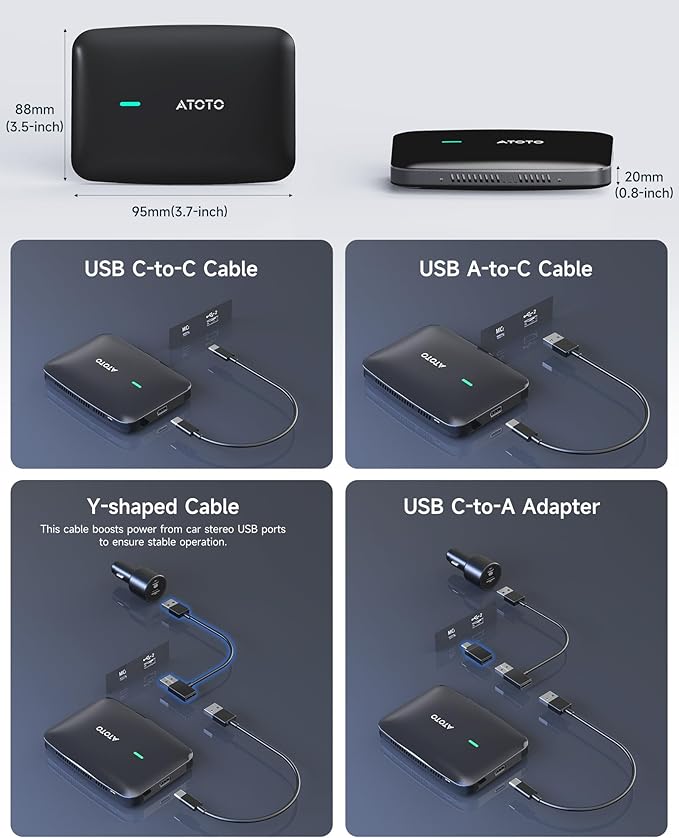
- Wide Compatibility: Works with common factory or aftermarket stereos that support wired CarPlay/Android Auto via USB (USB-A or USB-C). If your USB port doesn't provide enough power, the included Y-cable lets you draw extra power
- Product Care: 12 m0nths (extra 6 m0nths) of wa-rranty is provided by default from the date of purchase. Our product expert will assist your problems. Besides, please refer to the details in the package to view the online manual
- Connection Issue Check: ① Make sure that your original car stereo supports wired CarPlay/Android Auto (CP/AA). ② Check the indicator lights on the box — the inner green light means the power is properly connected. The outer green or blue light flashing slowly indicates that the CP/AA channel is connecting (green = CarPlay, blue = Android Auto). ③ If the connection fails, try switching between CP and AA modes by pressing and holding the switch button for 2–5 seconds. During switching, the outer light will flash rapidly to show the channel change.
Overview
- Compatible Devices : Smartphone
- Connector Type : Micro USB
- Color : Black
- Item dimensions L x W x H : 5.91 x 3.94 x 1.57 inches
- Brand : ATOTOMOVE
Share